What a Wallet Controls and Who Holds the Keys
Section 1 of 4
Your wallet manages authority
Your learning goal
Choose a custody description based on control, recovery and dependencies.
The word wallet suggests a container, but a crypto wallet usually manages authority over records on a network. Understanding who has that authority is more useful than looking at the application's balance screen. This lesson separates custody, internet exposure, signing devices and account recovery so that you can describe a wallet arrangement accurately.
Key idea
Describe who can authorise a transfer and how authority can be recovered.
Education only. Crypto assets can lose substantial value or become worthless. No lesson requires buying an asset, depositing money or sharing real passwords, private keys or recovery words.
Ask what is really inside a crypto wallet
Think about the keys you carry every day. One opens your front door, another starts the car. Neither key is your house or your car; they only let you in. Lose them, and the house still stands, but getting back in becomes a problem.
A crypto wallet works in a similar way. In Level 1 you learned that a private key signs a transaction and the network checks that signature. Your coins never sit inside your phone. They are recorded on the blockchain. What the wallet holds are the private keys that prove you may move those coins, plus tools to sign and send transactions. Ethereum.org's wallet guide puts it plainly: wallet providers do not hold your funds; they give you a window to see your assets and tools to manage them.
The key-ring analogy stops working in one important place. If you lose your house keys, a locksmith can let you in once you prove who you are. In crypto there is usually no locksmith. If the only copy of a private key is lost, the coins stay on the blockchain, but nobody can move them again.
If a wallet is really a key holder, why are there so many different kinds? The answer starts with a little history.
See how wallets developed over time
When Bitcoin's software was released in January 2009, the wallet was part of the same program that ran the network. It kept keys in a file on the user's computer. If the computer died without a copy of that file, the keys died with it.
People soon looked for safer and more practical methods. In September 2013, developers Marek Palatinus, Pavol Rusnák, Aaron Voisine and Sean Bowe proposed BIP-39, a standard that turns a wallet's secret into a list of ordinary words a person can write down. In July 2014, Palatinus and Rusnák's company launched the Trezor Model One, which Trezor describes as the world's first hardware wallet: a small device built to keep keys away from the internet. Many wallet apps, extensions and devices followed, and exchanges began holding keys for customers.
No single person invented "the crypto wallet". It grew step by step, balancing two goals that often pull apart: keeping keys safe and keeping them convenient. That tension starts with one question: who holds the keys?
Deleting an application does not normally erase the ledger holding, and copying an application does not create a second holding. A compatible recovery method can restore access on another device because the authority is recreated, not because coins are downloaded from a lost phone. Conversely, a person who copies your signing secret may gain access without taking the phone. A screenshot of the balance is not a backup of that authority.
Section 2 of 4
Custody is a trade-off
In a custodial arrangement, a provider manages the keys or controls transactions on your behalf. You usually authenticate to its service, then request an action under its rules. Recovery may involve identity checks or a password reset, but withdrawal still depends on the provider. The account can also be restricted, compromised or affected by insolvency.
In a non-custodial arrangement, the user controls the relevant authority, sometimes through more than one device or person. There may be no company that can reset it after all recovery material is lost. Some products mix arrangements, such as user-controlled signing with additional recovery participants. Ask who can sign, who can block an action, who can restore access and what happens when a party disappears. The custody label is a starting point, not a substitute for these questions.
Custody asks who controls the authority to move assets. With a typical custodial account, a provider controls keys and you request action through its service. With a typical self-custody wallet, you manage the required signing authority and its recovery arrangement.
Think of jewellery held through a storage service and jewellery in your own safe. The comparison explains responsibility, but a bank's safe-deposit box is not automatically protected by bank deposit insurance, and crypto custody has its own legal terms. Read the actual protection rather than borrowing reassurance from the analogy.
A forgotten service login may be reset after legitimate identity checks. Lost self-custody signing material may be unrecoverable if no valid backup or recovery route remains. Providers can fail or restrict withdrawals; individuals can lose secrets, approve harmful actions or misunderstand a backup.
| Question | Provider custody | Typical self custody |
|---|---|---|
| Who ordinarily signs | Provider or its custody arrangement | User under the wallet's design |
| Recovery depends on | Service procedures and availability | All required recovery components |
| Important failures | Hack, fraud, insolvency, account restriction | Secret theft, loss, device compromise, harmful approval |
| What to investigate | Terms, segregation, controls and customer rights | Backup, signing checks and usable recovery |
Neither choice removes market risk. Understanding both is the learning objective; no purchase or transfer is required.
Section 3 of 4
Hot, cold, software and watch-only
Separate hot wallets from cold wallets
Think about cash. A little sits in your pocket for bus fares; the rest stays at home or in the bank. Pocket money is handy but exposed to pickpockets; money at home is slower to reach but safer.
Crypto calls this hot and cold storage. Ledger Academy's guide to wallet types groups phone, desktop and browser wallets as hot, and hardware and paper wallets as cold.
Bitcoin.org gives the same pocket-money advice: keep only small amounts on devices you use daily, and use offline storage for savings. The analogy bends in one place. Cash at home is safe from pickpockets but not burglars; likewise, "cold" protects keys from remote attackers, but not from fire, loss, theft or coercion. The security lessons in Level 2 covers physical safety.
With both axes in place, look more closely at the wallets most people meet first: software wallets.
Meet software wallets on phones, computers and browsers
A software wallet is an app that keeps keys on a general-purpose device. Ethereum.org lists mobile apps, desktop applications and browser extensions. They are usually free and quick to set up.
A mobile wallet lives on your phone and goes everywhere with you. But phones are lost, stolen and broken, and Ledger Academy notes that mobile wallets can be targeted through hacking and attacks on your phone number. A desktop wallet runs on a computer, so it is only as safe as that computer; malware on the same machine may try to read files, record keystrokes or change what you paste. A browser extension wallet sits inside your web browser and lets websites ask it to sign things. It is convenient and very exposed, because it lives where you click links. Ledger Academy notes that browser wallets commonly operate in an environment exposed to internet content, which leaves them open to online attacks.
For larger amounts, many people add a device that keeps keys away from the phone and computer entirely.
Understand why paper wallets are risky
A paper wallet is a private key and its address printed on paper, often as QR codes. In Bitcoin's early years it was a popular way to keep coins offline.
Today educators treat paper wallets as risky. Ledger Academy points to physical damage and fraudulent generator websites, which can quietly keep a copy of the key they "give" you. Printers can store copies of what they print. Paper fades, burns and gets wet. And spending usually means typing or scanning the private key into a software wallet, which exposes it to that device.
A paper wallet is different from a paper backup: a recovery phrase written on paper or stamped into metal is a backup, and the next lesson explains how to store one well.
Paper and hardware wallets both hold keys. One more type deliberately holds no private keys at all, and it is surprisingly useful.
Look without touching: watch-only wallets
Think of the room board behind a hotel reception desk. Staff can see which rooms are taken, but the board cannot open any door. It is safe to have on show because it holds no keys.
A watch-only wallet works the same way. It is loaded with public information only, such as your addresses or, in some Bitcoin wallets, an extended public key. River's Bitcoin glossary describes watch-only wallets as able to show balances and receive bitcoin, but unable to authorise spending, because they do not store private keys.
That lets you check a cold-storage balance on your phone without the hardware wallet, or, as Level 0 suggested, practise tracking addresses before putting money in.
The trade-off is privacy: anyone with your watch-only details sees your balance and history. And beware a common trick: scammers show a wallet that seems to hold a large balance, then ask for a fee to "unlock" it. A balance you can see is not a balance you can spend.
So far each wallet has seemed to hold one kind of coin. Many wallets now handle several networks at once, which brings a new kind of mistake.
An offline backup is not automatically a cold wallet if the same secrets are also entered into an online application. Similarly, calling a product non-custodial does not mean the device is isolated from malware. Explain the actual handling of secrets rather than assuming a marketing term resolves every security question.
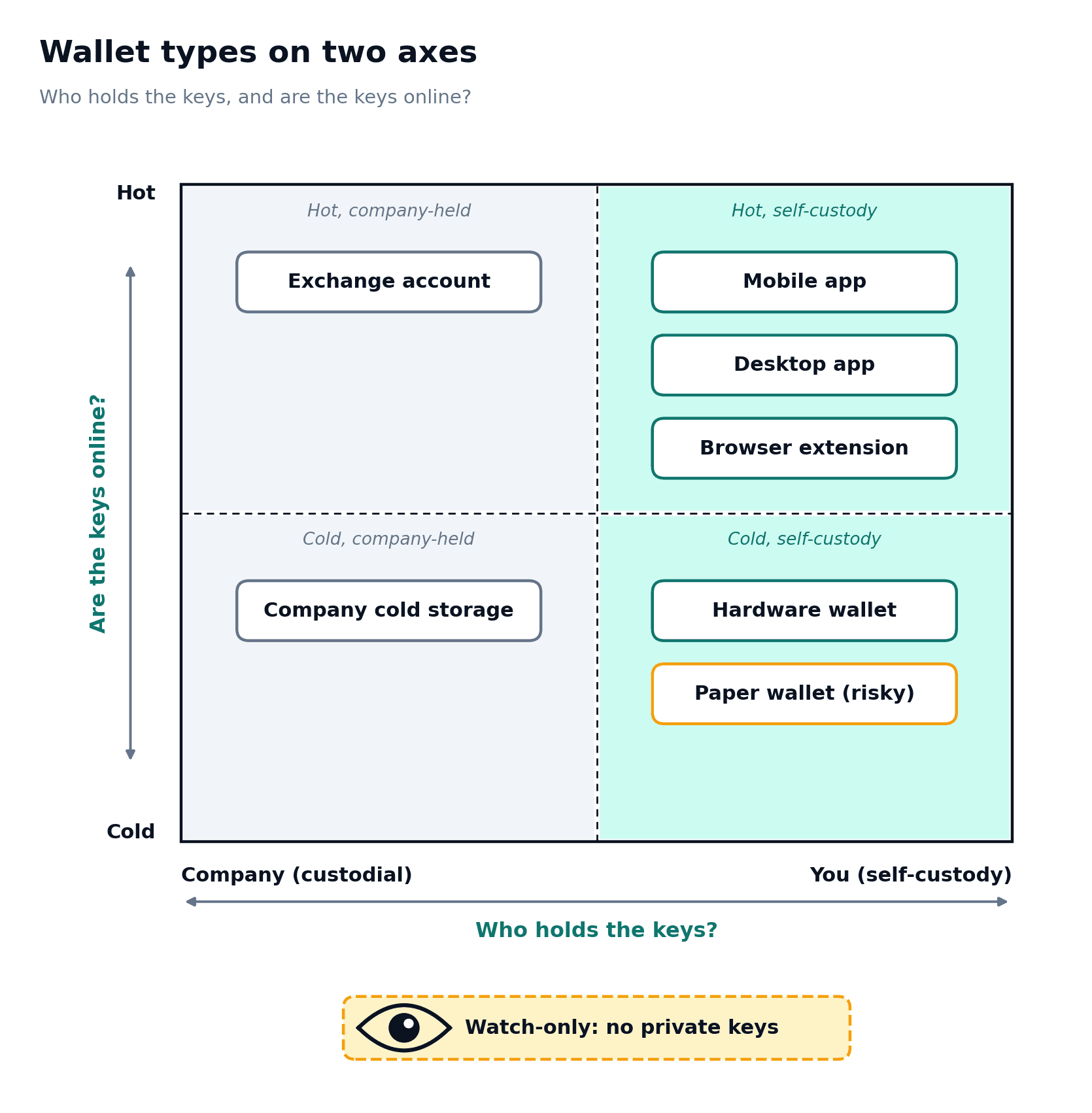
Read diagram as text
Hot/company-held: an exchange account. Hot/self-custody: mobile app, desktop app and browser extension.
Cold/company-held: company cold storage. Cold/self-custody: hardware wallet and a paper wallet marked risky.
A watch-only note says no private keys. Custody and online exposure are separate choices; a hardware wallet does not make every signature safe.
Section 4 of 4
Hardware signers, networks and a suitable setup
What a hardware signer helps protect
A hardware wallet is a signing device designed to keep secret keys within a controlled device environment. It can reduce particular risks associated with exposing keys on a general-purpose computer. It does not make a malicious contract or wrong address safe. A user who confirms a harmful action can still authorise it, and some requests may be difficult to interpret clearly.
Inspect the destination and action on the trusted device display where supported, and obtain the device and software through verified channels. A recovery phrase supplied prewritten with a device is a serious warning sign because another person may already know it. Device loss, theft, tampering and backup compromise remain considerations. No purchase is required for this course; the objective is to understand the role and limits of a signing device.
Imagine signing a cheque inside a sealed booth. The cheque slides in, you read and sign it inside, and it slides back out. Your pen never leaves the booth.
Networks genuine software and a suitable setup
A wallet interface can contain several accounts and addresses across several networks. An address format may appear on more than one compatible network, but the balances and assets belong to their respective ledgers. Viewing one network while expecting another can make a holding appear missing. A provider may not support the same asset on every network that uses a familiar format.
Password reset behaviour follows the custody and recovery arrangement. Resetting an exchange login can restore service access if the provider's checks succeed. Resetting an application password may require local data or recovery material and may have no effect on the underlying key. Before choosing a wallet, write a short description of its authority, exposure, recovery and network support. The next lesson turns that description into a secret-protection and continuity plan.
Imagine a travel card holding euros, pounds and yen in separate pockets. It is one card, but each pocket follows its own rules, and paying from the wrong pocket fails or costs extra.
Choose a set up by what the money is for
Choose an arrangement by its authority, exposure, recovery and purpose, rather than by a universal claim that one wallet is best. A watch-only setup can support learning without signing. A small online spending arrangement and an offline signer can have different roles, but both still need a sound process.
Write down which assets and networks are supported, who can sign, what the backup must restore, and which failures affect other accounts. If the arrangement is too complicated to explain or maintain, a valid decision is to remain with paper learning.
Everyday example
Try it yourself
Try each question on paper or explain your answer aloud before opening the worked answers. This practice is for learning; it is not scored.
1. Is a provider using cold storage automatically non-custodial for its customers?
2. A phone is lost but a valid wallet recovery method survives. Where is the asset record?
3. List four questions to ask about a wallet before using it.
Compare with the worked answers
Worked answers
1. No. The provider can still control the keys. Cold storage concerns exposure rather than customer authority.
2. It remains on the relevant ledger. The recovery method may restore authority through a compatible wallet.
3. Who signs, who can block, how recovery works, and what happens if the provider or device is unavailable. Network support and backup requirements also matter.
Quick knowledge check
Try each question on paper or explain your answer aloud before opening the worked answers. This practice is for learning; it is not scored.
Can a hardware wallet prevent every harmful transaction?
Compare with the worked answers
Worked answers
Answer. No. It helps protect keys but can still sign an action the user approves. Destination and permission checks remain necessary.
What to remember
Key points
✓ Wallet software manages authority over ledger records.
✓ Custody and hot or cold exposure describe different properties.
✓ Recovery must be understood before access is lost.
Lesson completion check
Check what you know
References and further reading
References
SEC Investor.gov: Crypto Asset Custody Basics for Retail Investors ↗
Ethereum: Ethereum security and scam prevention ↗
Bitcoin community: Bitcoin A Peer to Peer Electronic Cash System ↗
Bitcoin community: Bitcoin Developer Guide Transactions ↗
Bitcoin Developer Guide: Bitcoin Developer Guide — Wallets ↗
ethereum.org: ethereum.org — Ethereum wallets ↗
Bitcoin.org: Bitcoin.org — Securing your wallet ↗
Ledger Academy: Ledger Academy — What are the different types of crypto wallets? ↗