Protect Recovery Material and Secure Accounts
Section 1 of 5
Understand the recovery material
Your learning goal
Make a backup plan that matches the wallet's actual recovery model.
Several things may be called a wallet password, yet losing or exposing them has different consequences. A recovery phrase, a private key, an application password and an optional passphrase are not interchangeable. The goal of this lesson is a practical backup and account-security plan that you can explain without writing any real secret in the course document.
Key idea
A recovery plan is complete only when all required components can be found and used safely.
Education only. Crypto assets can lose substantial value or become worthless. No lesson requires buying an asset, depositing money or sharing real passwords, private keys or recovery words.
A recovery phrase in a wallet that uses one helps derive signing material according to the wallet's scheme. A private key is specific signing material. An application password commonly protects local access or an encrypted wallet file. An optional recovery passphrase, where supported, can change the wallet derived from the recovery words. The precise method and compatibility are product dependent.
Someone with a usable recovery phrase and any required additional secret may recreate authority elsewhere without the original application's password. By contrast, a forgotten local password might be recoverable using intact recovery material. A missing optional passphrase can make the intended wallet inaccessible even when the words are correct. Never assume support can reconstruct these secrets. Write the roles in your plan, while keeping actual secret values entirely out of class notes.
Find out what a seed phrase really is
Imagine a building where one master key opens every door. Keep it safe, and you can always cut new door keys. Let someone copy it, and they can walk into every room.
Earlier in the course you saw that a wallet holds keys, not coins. Most self-custody wallets create all of those keys from one secret, shown to you as a list of ordinary words: the seed phrase, or recovery phrase. Bitcoin.org's FAQ explains that, written down and stored securely offline, it lets you restore your entire wallet if a device is lost, stolen or broken.
The master-key picture has one twist. A building owner can change the locks after a master key goes missing. In crypto you cannot: if someone learns your seed phrase, the only defence is to move your funds to a brand-new wallet before they do.
The words follow a public standard. In September 2013, Marek Palatinus, Pavol Rusnák, Aaron Voisine and Sean Bowe proposed BIP-39 (Bitcoin Improvement Proposal 39), which sets out how a wallet turns random numbers into words. Wallets for many cryptocurrencies now use it, so it is worth knowing how the words are chosen.
Read the BIP-39 word list in plain words
Think of a bingo caller who reads out a word printed on each numbered ball instead of the number. Each word stands for a number, and words are far harder to miscopy than long strings of digits.
BIP-39 works like that. The wallet creates a large random number and adds a small checksum, a few bits calculated from the number so typos can be caught. The result is cut into pieces, and each piece selects one word from a fixed list of 2,048 words. The specification gives the sizes: 128 bits of randomness become 12 words, and 256 bits become 24 words (15, 18 and 21 words are also allowed, but rarer).
The English list was designed with care. BIP-39 says the first four letters of every word are unique, so "aban" can only mean "abandon". Similar pairs, such as "build" and "built", were left out, and the list is sorted alphabetically, starting "abandon", "ability", "able". That is why some metal backup plates have room for only four letters per word.
Possible 12-word phrases = 2,048¹² = 2¹³²; valid phrases after the checksum ≈ 2¹²⁸That randomness must come from the wallet, never from you: a phrase you invent, such as song lyrics, can be guessed. Next, what do the words unlock?
See how one phrase opens many accounts
Think of a family tree: knowing the grandparent at the top, you can draw every branch below.
A seed phrase is the top of such a tree. From it, the wallet calculates a master key, and from that, as many accounts and addresses as you need, on one or several blockchains. So you can use a new address for every payment yet back up only once, and the same phrase can usually restore your wallet in another app that follows the standard.
The tree has a limit: wallets do not all organise their branches the same way, so a restore in a different app can look empty until the right settings are chosen. That is one reason to test a restore early. First, though, the words must be written down correctly.
Section 2 of 5
Passphrases, multisig and other recovery models
Some wallets use social recovery, multiple signatures, multi-party computation or service-assisted arrangements. These designs divide authority or recovery differently. A threshold may require a specified number of participants, and recovery may involve waiting periods, guardians or account contracts. Their risks include participant failure, collusion, compromised recovery accounts and misunderstood procedures.
Do not apply a recovery-phrase tutorial to a wallet that has no such phrase. Read the actual product documentation and identify what is sufficient to restore access. Ask whether a recovery provider can act alone, whether a change takes effect immediately and how the user receives notice. A procedure that depends on two unavailable relatives is not usable simply because the design has a security label. Availability and independence matter as well as secrecy.
Decide whether an optional passphrase is right for you
Picture a hotel safe that needs a key and a code. A thief with the key still cannot open it, but if you forget the code, it stays shut for you too.
BIP-39 allows an optional passphrase, sometimes called a "25th word", although it can be any text you choose. The wallet mixes the passphrase with the seed phrase to create the wallet. The specification notes that every passphrase produces a valid wallet, so a different passphrase opens a different, usually empty, wallet. Trezor explains the practical effects: passphrases are case-sensitive, a typo opens a different wallet, and a lost passphrase cannot be reset or recovered by anyone.
The benefit: a thief who finds the seed phrase sees only the standard, empty wallet. The cost: a second secret that must be backed up, stored apart from the seed phrase and reproduced exactly, capitals and spaces included. Added without a plan, a passphrase can lock you out of your own funds.
A passphrase only helps if both secrets truly work. The only way to know that is to test them.
Understand multisig and why it is used
Think of a company cheque that needs two signatures out of three directors. No single director can empty the account alone, and if one director is away, the other two can still sign.
A multisig (multi-signature) wallet works the same way. It is set up with several keys, often on separate devices kept in different places, and a rule such as "2-of-3": any two of the three keys must sign before funds can move. Trezor explains the main benefits: no single lost or stolen key can lose or steal the funds, it suits organisations where several people must approve spending, and it can help with inheritance. Bitcoin.org also lists multi-signature as a protection against theft. Trezor notes that multisig has been widely used in the Bitcoin community since 2012.
Multisig has real costs. It is more complex to set up and recover. Each key needs its own backup, and the wallet's setup details (for Bitcoin, the extended public keys of every signer) must be saved too, or the funds may be unspendable even with enough keys. Fees can be higher, and changing a key usually means a new wallet.
Multisig also has a limit worth remembering. It protects against one key being lost or stolen, but not against every signer being fooled into approving the same bad transaction. You will see a large, dated example of that in the transfer checking lesson in Level 2.
Backups, passphrases and multisig all protect you. The last question is what happens to your crypto when you cannot act at all.
Section 3 of 5
Write, store and test backups safely
A backup must survive plausible accidents while resisting theft. Consider fire, water, device failure, moving house and unauthorised access. Storing every copy in one bag protects poorly against losing the bag. Leaving several copies casually accessible increases theft risk. Choose locations and methods that fit the wallet's requirements, your household and your ability to recover them.
Avoid ordinary cloud notes, email, screenshots and unknown websites for recovery material. These can create additional copies and expose accounts that were not designed as signing-secret stores. A recovery check should follow verified wallet guidance in a controlled environment; it is not an invitation to type words into a random verification form. Test the documented procedure with a separate practice arrangement before relying on it. Never submit actual recovery material to PipStart or a reviewer.
What each secret is for
| Item | Typical role | Dangerous misunderstanding |
|---|---|---|
| Recovery phrase where used | Recreate wallet signing material | Treating it as harmless support data |
| Private key | Authorise particular spending conditions | Sharing it to prove ownership |
| Application password | Protect local or service access | Assuming it revokes copied keys |
| Optional recovery passphrase | Select or protect a derived wallet | Assuming the words alone always suffice |
| Authentication recovery code | Restore an account authentication route | Leaving it in an exposed account |
| Recovery participant | Perform part of a defined recovery process | Assuming availability without checking |
Think about where you keep a passport: not in your pocket on the bus, but somewhere dry and private that you can find again.
Imagine posting your bank PIN to yourself on a postcard. It might arrive, but many people would see it on the way. Digital copies of a seed phrase are that postcard.
Test a restore before you rely on it
A recovery check should confirm that all required backup components correspond to the intended wallet without destroying the only working access. Follow the genuine wallet's documented backup-check procedure. Some hardware devices can verify a backup without wiping the live device.
For the course, rehearse with an empty practice wallet and fresh practice material. Do not enter real recovery words into a website or course file. If a device reset is involved, preserve the original access until a safe check has established that the required material and settings work. A reset should not be a beginner's first diagnostic move on a funded wallet.
Record the wallet method, whether a passphrase is required, relevant account or derivation settings and the date checked. Multisig can also need policy information and public-key descriptors, not merely one set of words. A matching address is useful evidence within the documented procedure; an empty screen can mean wrong settings rather than proof that the ledger assets vanished.
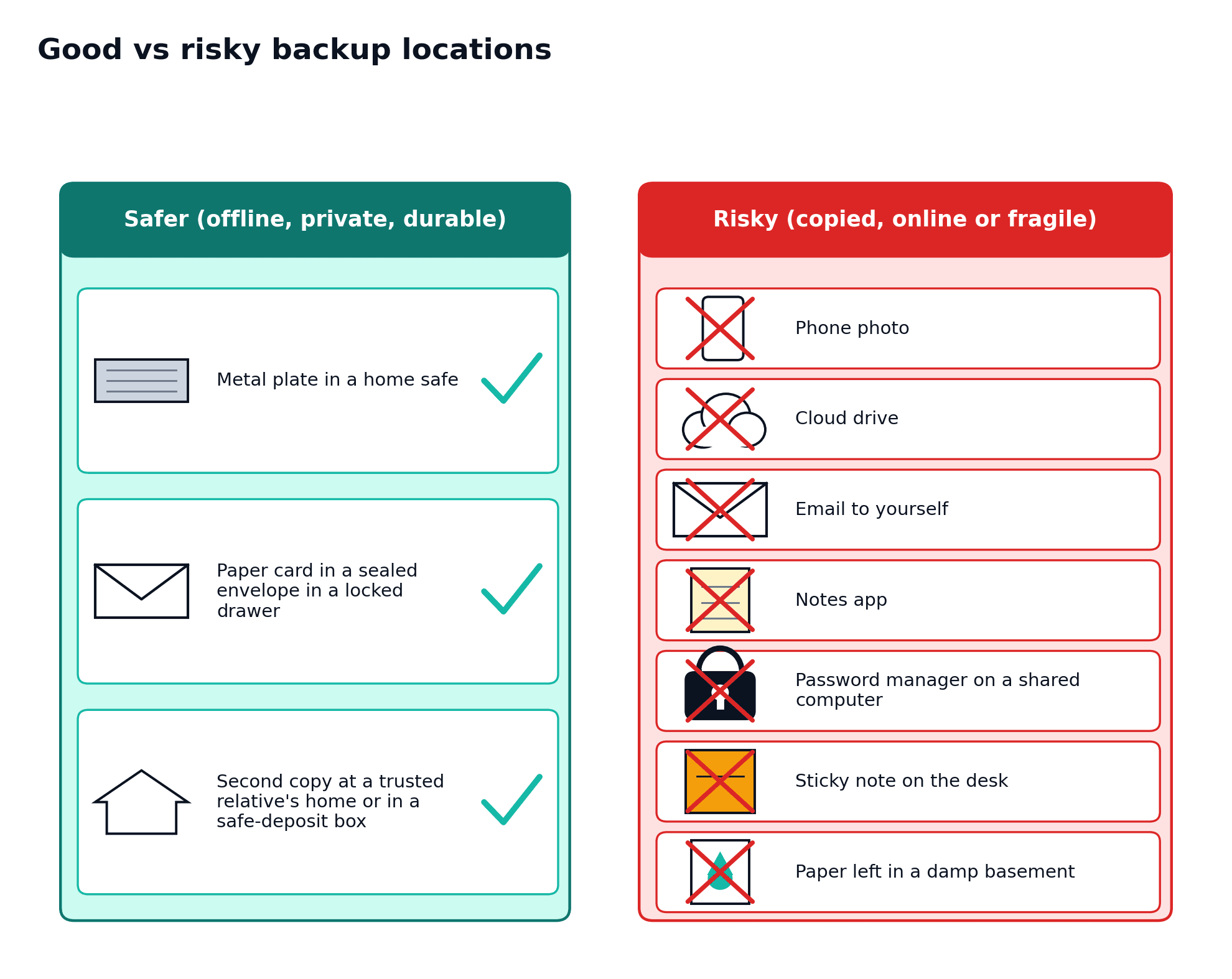
Read diagram as text
The illustrative safer column shows a metal plate in a home safe, a sealed paper card in a locked drawer, and a second copy with a trusted relative or in a safe-deposit box.
The risky column shows a phone photo, cloud drive, email, notes app, password manager on a shared computer, desk sticky note and damp-basement paper.
These are comparisons, not blanket endorsements. Protect confidentiality and physical durability, test compatibility safely, and account for every required recovery component.
Section 4 of 5
Phishing, devices and account recovery
Ask why attackers go after people not blockchains
Think about a bank vault with walls a metre thick. A burglar rarely drills through the wall. It is far cheaper to phone the manager, pretend to be head office and ask for the combination.
The same distinction helps when discussing crypto. Signatures are hard to forge and a random seed phrase cannot be guessed, so attackers aim at the softest part of the system: you, your devices and your phone number. They try to make you reveal a secret, install something harmful, send coins to the wrong address or sign something you did not understand.
The vault analogy stops working in one place. A bank can often freeze a stolen transfer, but as Level 0 explained, a confirmed crypto transfer generally cannot be reversed by anyone. The defence has to happen before you click, type or sign, starting with the most common trick: a fake copy of a real website.
Spot fake websites and search ads
Picture a shop that copies your bank's sign, colours and uniforms. Inside, a friendly clerk asks you to "confirm" your PIN. Everything looks right except the address on the door.
Fake crypto websites work in that way. A criminal copies the look of an exchange or wallet, registers a web address with one letter changed or a word added, then pays for search ads or sends links by email, text or social media. Whatever you type into the copy, whether a password, a two-factor code or a seed phrase, goes to the criminal. Ledger Academy's security checklist warns that an email or advert claiming to be genuine is not proof that it is.
You met the app-store version of this trick in the wallet and custody lesson in Level 2. For websites, type the address yourself or use a bookmark saved from the official site, and treat search ads, unexpected emails and direct messages as untrusted, however polished. No genuine website ever needs your seed phrase.
Fake websites wait for you to arrive. The next trick comes looking for you, wearing a helpful face.
Recognise fake support and impersonators
Imagine a stranger in a car park wearing a high-visibility vest: "I work for the council, give me your car keys and I'll move it for you." The vest is meant to stop you thinking.
Fake support works on the same instinct. Criminals post fake helpline numbers, reply to people who complain on social media, or phone and text while pretending to be an exchange or wallet company. Coinbase's help centre describes the pattern: fake agents ask for passwords, two-step verification codes or seed phrases, may ask you to install software that lets them control your device, and urge you to move funds to a "safe" wallet the criminal controls.
The analogy has a limit: you can see the stranger in the car park. Online, a caller's number and a profile picture can both be faked, so appearance proves nothing.
Some attackers skip conversation altogether and go straight for your device.
Understand how malware reaches your devices
Think about a parcel at your door that looks like something you ordered. Once you carry it inside, whatever is in it is in your home.
Malware arrives the same way: inside "free" copies of paid software, fake updates, email attachments or installers from unofficial sites. In crypto, three kinds matter most. Fake wallet apps steal the keys you create (the wallet and custody lesson in Level 2). Remote-access tools, often legitimate support-desk programs, let a criminal control your screen once you are talked into installing one. And information stealers hunt for wallet files, saved passwords and anything typed or copied.
The parcel analogy falls short in one way: a parcel announces itself when opened. Malware is built to stay quiet, and you may notice nothing until funds have gone. That is why the next trick works so well.
Watch for malicious browser extensions
Think of a houseguest you allow into every room. Most guests are honest; a dishonest one can read your post and copy your keys.
A browser extension is that guest. Once installed, it can often read and change the pages you visit, including your wallet's, which is one reason the wallet and custody lesson in Level 2 called browser wallets very exposed. Ledger Academy reports that in July 2025 researchers found more than 40 fake wallet extensions in the Firefox add-on store. They copied the branding and descriptions of genuine wallets, carried fake reviews, and harvested private keys and logins once installed.
The analogy stops working in one place: a guest who behaves well on day one usually stays that way. An extension can change owner or receive a harmful update later, without you doing anything.
So install a wallet extension only from the link on the wallet's official website, keep extensions to the few you really use, and be wary of any that want to "read and change all your data on all websites" without a clear reason.
An extension waits inside your browser. A drainer link tries to bring you to it.
Understand SIM swaps and why SMS codes are weak
Imagine someone persuades the post office that they are you and that you have moved. From that day, your letters, including new bank cards and security codes, go to their address.
A SIM swap does this to your phone number. The US Federal Trade Commission explains that a scammer contacts your mobile provider, claims your phone was lost or damaged, and has your number moved to a SIM card they control. Your calls and texts then go to the criminal, and any account that relies on text-message codes or "forgot password" texts can be taken over.
In February 2022, the FBI's Internet Crime Complaint Center (IC3) warned that SIM swaps were rising: 320 complaints with about US$12 million in losses from January 2018 to December 2020, then 1,611 complaints with more than US$68 million in losses in 2021 alone.
The post-office analogy breaks down at speed: redirected letters take days, while a SIM swap can be used within minutes. The FTC suggests adding a PIN or password to your mobile account. The bigger fix is to stop relying on text messages for security.
Choose stronger two factor authentication
Two-factor authentication combines different kinds of evidence, such as a password and possession of an authentication device. Its strength depends on the method and the recovery route.
| Method | Useful property | Remaining issue |
|---|---|---|
| SMS code | Adds a check beyond a password | Phone-number takeover and phishing can capture it |
| Authenticator code | Avoids reliance on the mobile number for the routine code | A fake login page can still capture a code; recovery needs planning |
| Correctly implemented passkey or security key | Binds authentication to the genuine service and can resist phishing | Device loss, account recovery and unsafe alternative login routes still matter |
Keep devices clean and holdings private
Think of a household that locks its doors, mends broken windows and does not tell strangers where the jewellery is kept. Together, these dull habits make a poor target.
Device hygiene means the same steady care for phones and computers. Install updates promptly, since many fix security holes. Download software only from official sources, as Kaspersky advised, and avoid "cracked" software. Use a screen lock, unique passwords and a password manager, and, as the FBI advises, don't store login details on your phone. Some people keep one device or browser profile for crypto only. Update hardware-wallet firmware through the official app; Ledger Academy recommends doing so regularly.
Privacy matters as much as software. The FBI's SIM-swap warning advises against publicising financial assets on social media or sharing details that help someone impersonate you. Balance screenshots and boasts at meet-ups mark you out. A criminal who believes you hold a lot may try a SIM swap, a targeted message, or even a threat in person.
These habits reinforce each other. Now practise using them.
Authentication apps and SMS have different threat models; phone-number takeover can undermine SMS-based recovery. Record which account can reset which other account so that a single weak recovery path is not overlooked.
Section 5 of 5
Continuity and inheritance without revealing secrets
Plan for emergencies and inheritance without exposing secrets
Think of a sealed envelope left with a family solicitor: "to be opened if I cannot manage my affairs". It tells the right person what exists and where to look, without taping the house keys to the front door.
Crypto needs the same planning, because there is no bank that can hand your heirs your balance. Bitcoin.org advises thinking about your testament so that your heirs can find your wallets and recover them. Ledger Academy's guide to crypto inheritance explains that what must pass on is signing authority: the ability to use your keys. It suggests keeping a guide for heirs, a letter of instructions, that says where each device and backup is kept and how recovery works for each network. It also warns that untrained heirs can be tricked into typing a seed phrase into a fake site or downloading a fake app, so naming a trusted person who understands the basics helps.
The plan must let the right person in without letting the wrong person in sooner. Describe where things are, rather than writing secrets into documents several people will read. Split information so no single paper reveals everything. List any custodial accounts, since heirs must contact each company. And review it: Ledger suggests checking every six months that devices work and instructions are accurate, and updating after events such as marriage, a birth or a move.
That letter is the heart of a written recovery plan.
Write a recovery plan you can actually use
A recovery plan is a short offline document that lets you or a trusted person rebuild access calmly. It is a map, not a treasure chest.
| Include | Never include |
|---|---|
| A list of wallets and accounts (type, network, purpose) | The seed phrase or any of its words |
| Where each device and backup is kept, and who holds which part | The passphrase, written next to the seed phrase |
| Which wallet software or device restores each backup | Passwords or PINs in the same document as backups |
| Whether a passphrase or multisig is used, and how many keys are needed | Screenshots or photos of anything secret |
| Contacts: trusted person, lawyer, exchanges to notify | Instructions to "send the phrase to support" |
| Date of the last test restore and next review date | Exact balances, if the paper might be seen by others |
Keep one copy where you can reach it and one with your trusted person or lawyer. Now try putting these ideas to work.
It should not expose secrets in an ordinary will, shared course file or broadly accessible family message. Legal arrangements and local inheritance requirements may also matter. A plan that has never been checked may depend on forgotten passwords or obsolete software.
Everyday example
Try it yourself
Try each question on paper or explain your answer aloud before opening the worked answers. This practice is for learning; it is not scored.
1. Why might changing a local password fail to protect a wallet after phrase exposure?
2. Design a backup plan using placeholders for one device-loss event and one physical-damage event.
3. Name a weak recovery chain involving email and a phone number.
Compare with the worked answers
Worked answers
1. An attacker may recreate the signing authority outside that application. The copied phrase remains usable under its scheme.
2. A suitable fictional plan specifies verified recovery instructions and protected independent backup locations, with a check that the necessary components survive both events. It must avoid publishing the secrets.
3. An exchange resets through email, email resets through SMS, and the phone number is taken over. Securing only the exchange password leaves the recovery chain vulnerable.
Quick knowledge check
Try each question on paper or explain your answer aloud before opening the worked answers. This practice is for learning; it is not scored.
Do all wallets use a recovery phrase with the same restoration steps?
Compare with the worked answers
Worked answers
Answer. No. Wallets may use different key, guardian, threshold or service-assisted schemes. Apply the actual documented method.
What to remember
Key points
✓ Different secrets protect different layers.
✓ A backup must remain confidential and usable.
✓ Secure account recovery paths as well as ordinary login.
Lesson completion check
Check what you know
References and further reading
References
Ethereum: Ethereum security and scam prevention ↗
SEC Investor.gov: Crypto Asset Custody Basics for Retail Investors ↗
MetaMask: I have been hacked or scammed ↗
Bitcoin community: Bitcoin A Peer to Peer Electronic Cash System ↗
Bitcoin community: Bitcoin Developer Guide Transactions ↗
Bitcoin Developer Guide: Bitcoin Developer Guide — Wallets ↗
Bitcoin community: Bitcoin FAQ ↗
Bitcoin.org: Bitcoin.org — Securing your wallet ↗
Federal Trade Commission: Federal Trade Commission — SIM swap scams: how to protect yourself ↗